Wix to Shopify: The Complete Guide to Migrating Your Store the Right Way
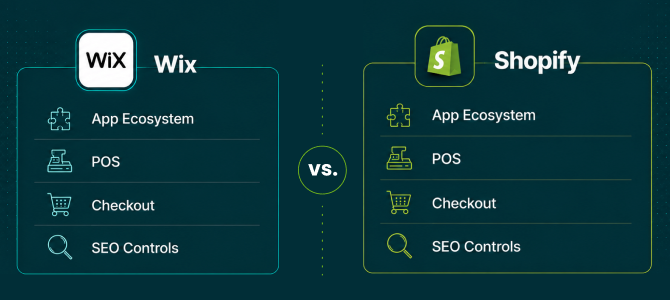
If you built your store on Wix and you're bumping into its ceiling, thin app selection, checkout that can't flex with growth, and no real point-of-sale story, you're not alone. Thousands of merchants make the move from Wix to Shopify every year, and for good reason. Shopify's app ecosystem, POS, and infrastructure are built for stores that are scaling.
But knowing you should migrate your Wix store to Shopify and actually doing it without losing products, customers, orders, or your hard-won Google rankings are two very different problems. Here's exactly what a Wix to Shopify migration involves, what usually goes wrong, and how to do it without the downtime horror stories you've probably read about.
Why Migrate
Why Merchants Are Moving From Wix to Shopify
Wix is a solid starting point, but it wasn't built to be an ecommerce engine first. Shopify offers a deeper app marketplace for shipping, subscriptions, and marketing; a proper POS for merchants who sell in person; and checkout infrastructure that holds up under real traffic spikes. Store owners running wholesale or B2B lines also find Shopify's tooling far more mature.
None of that matters, though, if the migration itself wipes out two years of customer history and blog SEO in the process.
Thinking about the switch? Run a free demo migration with Shift It Now on your real Wix catalog before you commit to anything.
What Moves Over
What Actually Moves When You Migrate a Wix Store to Shopify
A proper Wix to Shopify migration should carry over products and variants, product images, customer accounts and addresses, full order history with line items, blog posts, and site pages.
What typically doesn't transfer, regardless of tool, is anything tied to Wix-specific features with no Shopify equivalent, including Wix Bookings and Events, member-gated content, and restaurant menu modules.
Knowing this upfront means no surprises on launch day.
Migration Steps
The Right Way to Run a Wix to Shopify Migration
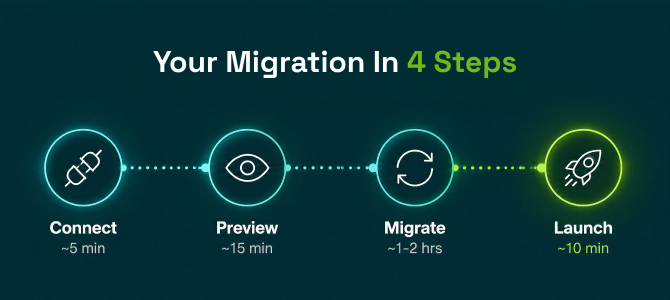
A clean migration follows four stages:
- Connect your Wix store. OAuth authorization takes about two minutes, with no CSV exports.
- Preview a demo migration on a slice of your catalog to check field mapping.
- Migrate the full catalog while your Wix store keeps taking orders. This typically takes two hours to three days depending on catalog size.
- Launch with a final delta sync, the DNS switch, and ideally a rollback window in case anything looks off.
Talk to a migration expert about your catalog size and timeline before you schedule the move.
Tool Gaps
Why Most Migration Tools Fall Short
Here's the part nobody tells you upfront: most migration tools only move product listings. Customers, order history, coupons, and SEO redirects get left behind for you to rebuild manually. That's exactly how merchants end up with broken links, lost rankings, and support tickets from customers who can't find their order history.
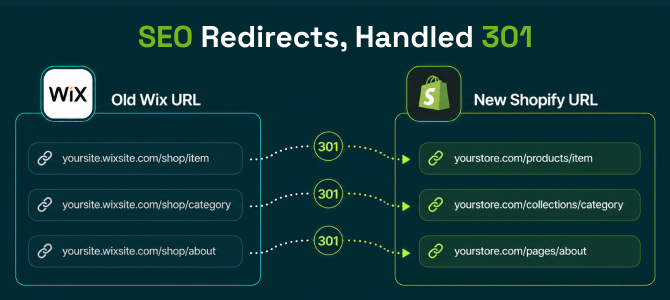
Instead of a tool that only handles half the job, look for one built to move the whole store in one pass. This is where a dedicated Shopify migration app like Shift It Now earns its keep: it pulls products, customers, full order history, blog content, and pages through the Wix Stores API in a single authorized connection, then auto-generates 301 redirects for every old URL so your SEO equity doesn't reset to zero.
See exactly what migrates platform by platform before you start.
SEO Protection
Protecting Your SEO During the Move
Rankings are usually the biggest fear merchants have about migrating. A migration that skips SEO handling will cost you months of recovery time.
Look for these essentials:
- Automatic 301 redirects on every URL
- Migrated meta titles and descriptions
- Preserved image alt text
That combination is what keeps your existing search visibility intact instead of starting from zero on Shopify.
Pricing
How Much Does a Wix to Shopify Migration Cost?
Cost scales with catalog size. As a general benchmark:
| Catalog Size | Typical Cost |
|---|---|
| Up to 30 products, 30 orders, 30 customers, 2 pages and 2 posts | Free |
| Up to 1,000 products, 500 orders, 500 customers, 10 pages and 10 posts | $49 one-time |
| Up to 5,000 products, 1,000 orders, 1,000 customers, 50 pages and 50 posts | $99 one-time |
| Above these limits | Contact us |
Compare that to hiring an agency for a manual rebuild, which commonly runs into the thousands and takes weeks longer.
Get an instant price estimate for your specific catalog size.
Frequently Asked Questions (FAQs)
1. How long does a Wix to Shopify migration take?
Most stores complete the full migration in two hours to three days, depending on catalog size. A small catalog under 500 products often finishes the same day.
2. Will I lose my SEO rankings when I migrate my Wix store to Shopify?
Not if the tool handles redirects properly. Auto-generated 301 redirects, migrated meta titles and descriptions, and preserved alt text are what keep your rankings intact after the switch.
3. Can I migrate customers and order history from Wix to Shopify, or just products?
This is exactly where most migration tools fall short. Many only migrate products and leave customer accounts and order history behind. A complete migration tool should move customer accounts, addresses, and full order history with line items alongside your product catalog.
4. Do I need a developer to migrate Wix to Shopify?
No, not for a standard Wix Stores migration. OAuth-based connections mean you authorize access in one screen rather than exporting CSVs or writing scripts. Developer help is really only needed for heavily customized or headless setups.
5. What's the difference between a generic migration app and a full-service one?
Generic migration tools typically move only sample data or products, leaving you to manually re-enter customers, rebuild order history, and set up your own redirects. Full-service tools, like Shift It Now, migrate the complete store including products, customers, orders, blog content, and SEO redirects in one pass, with a rollback safety net if something looks wrong after launch.
6. What doesn't migrate from Wix to Shopify?
Features with no direct Shopify equivalent generally don't transfer. This includes Wix Bookings and Events, member-gated content, and restaurant menu modules.
Final Thoughts
Final Thoughts
Migrating from Wix to Shopify doesn't have to mean a rebuilt-from-scratch storefront or a month of cleaning up broken links. With the right approach and the right tool, you can move your full catalog, customer base, and SEO equity across in days.
Ready to Migrate Your Wix Store?
Install Shift It Now from the Shopify App Store and run a free demo migration on your real Wix catalog. No card required.
Why Choose Shift It Now?
- ✔ Automated Wix to Shopify migration
- ✔ Products, customers, orders, pages, and blog content transferred
- ✔ SEO-friendly migration with 301 redirects
- ✔ OAuth-based connection with no CSV hassle
- ✔ No coding required
- ✔ Minimal downtime during launch