BigCommerce to Shopify: The Complete Migration Guide
Planning a BigCommerce migration to Shopify? See what data moves, how long it takes, and how to protect your SEO rankings during the switch.
If you're running a BigCommerce store and eyeing a move to Shopify, you're in good company. A BigCommerce migration to Shopify is one of the more common platform switches in ecommerce right now, usually driven by Shopify's larger app marketplace, deeper theme selection, and a pricing structure that doesn't gate features behind revenue thresholds the way BigCommerce's plans can.
The hard part was never deciding to switch. It's moving your products, customers, order history, and search rankings across without weeks of manual cleanup. Here's exactly what a BigCommerce to Shopify migration involves, what tends to go wrong, and how to do it properly.
Why Migrate
Why Merchants Choose to Migrate BigCommerce to Shopify
BigCommerce is a capable platform, but a few things consistently push growing merchants toward Shopify: a far larger app and theme ecosystem, a built-in POS for merchants who also sell in person, and a simpler plan structure that doesn't force an upgrade purely because your annual sales crossed a threshold. For merchants running B2B or wholesale lines alongside D2C, Shopify's newer B2B tooling and app depth also tend to close the gap that used to favor BigCommerce.

Curious what your move would actually look like? Run a free demo migration with Shift It Now on your real BigCommerce catalog first.
What Moves Over
What Actually Migrates From BigCommerce to Shopify
A proper BigCommerce to Shopify migration pulls across:
- Products and variants with images
- Customer accounts and addresses
- Full order history, including line items, taxes, and refunds
- Blog posts and site pages
BigCommerce stores also carry a few platform-specific pieces worth flagging: multi-channel listings, B2B Edition customer groups, and content built into your Stencil theme.
A complete migration should preserve customer groups and channel data rather than flattening everything into a single default customer type, and Stencil-based content should land as proper Shopify pages, not get dropped.
Migration Steps
The Right Way to Run a BigCommerce Migration to Shopify
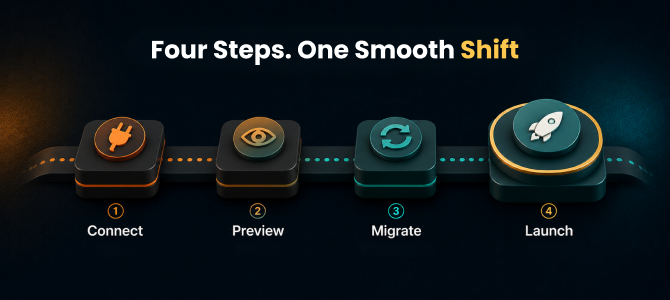
The cleanest migrations follow four stages:
- Connect your BigCommerce store through the Management API (v2/v3) using store-level OAuth authorized from your BigCommerce control panel.
- Preview a demo migration on a sample of your catalog to confirm field mapping looks right.
- Migrate the full catalog while your BigCommerce store keeps taking live orders, typically finishing anywhere from two hours to three days depending on catalog size.
- Launch with a final delta sync for anything that came in during migration, the DNS switch, and ideally a rollback window if anything needs a second look.
Talk to a migration expert about your B2B Edition or multi-channel setup before scheduling the move.
Tool Gaps
Why Most Migration Tools Fall Short on BigCommerce
Here's what catches a lot of merchants off guard: most generic migration tools handle basic products fine, then quietly drop the more complex parts of a BigCommerce store: customer groups, multi-channel listings, and order history, leaving you to rebuild them by hand.
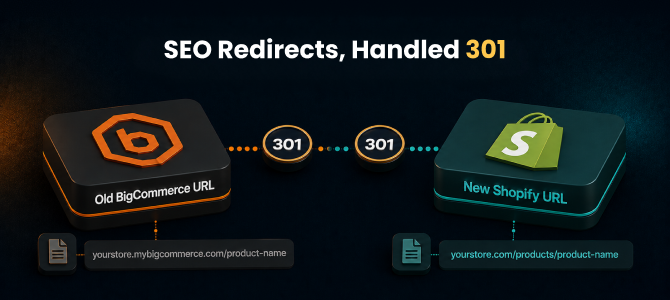
That's the difference between a tool that migrates "products" and one that migrates your store. Instead of a bare-bones import, look for a Shopify migration app built to carry over the full picture: products, customers, complete order history, blog content, and pages, in a single authorized connection, with auto-generated 301 redirects so your SEO doesn't reset to zero on launch day.
See the full platform breakdown for exactly what moves from BigCommerce.
SEO Protection
Protecting Your SEO During the Move
Rankings are the top concern in almost every BigCommerce to Shopify migration conversation, and rightly so. A migration that skips SEO handling can cost months of recovery.
Look for these essentials:
- Automatic 301 redirects on every URL
- Migrated meta titles and descriptions
- Preserved image alt text
- Existing blog content and reviews carried over intact
That's what keeps your search visibility from resetting when you switch platforms.
Pricing
How Much Does a BigCommerce to Shopify Migration Cost?
Pricing generally scales with catalog size rather than a flat agency fee. Smaller catalogs cost far less than a full custom rebuild, and ShiftItNow offers Free, $49 Growth, and $99 Scale plans with a one-time charge for paid plans through its migration tool, compared to $8,000-$25,000 and a much longer timeline for a hired agency rebuild.
Scale includes up to 5,000 products, 1,000 orders, 1,000 customers, 50 pages, and 50 posts. All plans include 24/7 dedicated support. Because every BigCommerce store's channel and B2B setup is a little different, it's worth getting a live quote against your actual product count rather than assuming a flat number.
Get an instant price estimate based on your catalog size.
Frequently Asked Questions (FAQs)
1. How long does a BigCommerce to Shopify migration take?
Most stores complete the full migration in two hours to three days, depending on catalog size and the complexity of your B2B or multi-channel setup.
2. Will I lose my SEO rankings when I migrate BigCommerce to Shopify?
Not if the migration handles it properly. Auto-generated 301 redirects, migrated meta titles and descriptions, and preserved alt text are what keep your existing rankings intact after the switch.
3. Can I migrate B2B Edition customer groups and multi-channel listings from BigCommerce to Shopify?
This is exactly where many migration tools fall short. They migrate basic products but flatten or drop customer groups and channel data. A complete migration should carry these across rather than requiring you to rebuild them manually.
4. Do I need a developer for a BigCommerce migration to Shopify?
Not for a standard migration. OAuth-based connections through the BigCommerce Management API mean you authorize access from your control panel rather than exporting CSVs or writing custom scripts. Developer help is really only needed for heavily customized Stencil builds or unusual custom integrations.
5. What's the difference between a generic migration tool and a full-service one like Shift It Now?
Generic migration tools typically move only products, leaving customers, order history, channel data, and redirects for you to rebuild by hand. A full-service tool migrates the complete store in one pass: products, customers, orders, blog content, and SEO redirects, with a rollback safety net if something looks off after launch.
6. What doesn't migrate from BigCommerce to Shopify?
Standard store data such as products, customers, orders, blog posts, and pages all migrate. Anything tied to a heavily customized Stencil template or a niche third-party BigCommerce app with no direct Shopify equivalent may need manual review, which is exactly what the preview step is designed to catch before you commit.
Final Thoughts
Final Thoughts
Switching platforms doesn't have to mean a rebuilt-from-scratch store or weeks spent untangling customer groups and broken links. With the right approach, a BigCommerce migration to Shopify moves your full catalog, customer base, and SEO equity across in days, not months.
Ready to Migrate Your BigCommerce Store?
Install Shift It Now from the Shopify App Store and run a free demo migration on your real BigCommerce catalog. No card required.
Why Choose Shift It Now?
- ✔ Automated BigCommerce to Shopify migration
- ✔ Products, customers, orders, pages, and blog content transferred
- ✔ SEO-friendly migration with 301 redirects
- ✔ B2B Edition customer groups and channel data handled with more care
- ✔ No CSV exports or manual scripts required
- ✔ Minimal downtime during launch