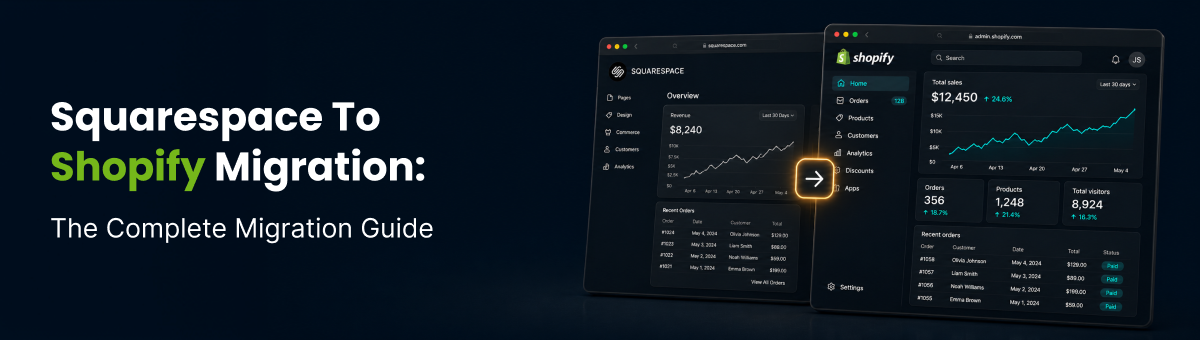
Squarespace to Shopify: The Complete Migration Guide
Planning a Squarespace migration to Shopify? See what data moves, how long it takes, what it costs, and how to protect your SEO rankings.
Squarespace is a great platform for launching a beautiful store fast, but a lot of merchants eventually hit its ceiling. A Squarespace migration to Shopify is one of the most common platform switches in ecommerce, and it's rarely about Squarespace being "bad." It's about outgrowing a website builder that was never built to be a dedicated ecommerce engine.
The question isn't whether you should move. It's how to migrate your Squarespace store to Shopify without losing products, customers, order history, or the SEO rankings you've already earned. Here's exactly what a Squarespace to Shopify migration involves, what tends to trip merchants up, and how to do it properly.
Why Migrate
Why Merchants Migrate From Squarespace to Shopify
Squarespace caps out around 10,000 products and roughly 250 variant combinations per product, which is fine for a boutique catalog but restrictive once you're scaling. It also only supports a single store currency, making international selling harder without workarounds, and offers a narrower set of payment gateways compared to Shopify's much broader list.
On top of that, Shopify's app ecosystem is dramatically larger, giving growing stores access to far more tools for shipping, subscriptions, and marketing, plus stronger built-in conversion features like abandoned cart recovery and accelerated checkout.

Curious what your move would actually look like? Run a free demo migration with Shift It Now on your real Squarespace catalog first.
What Moves Over
What Actually Migrates in a Squarespace to Shopify Migration
A proper migration should carry across your full product catalog with variants and images, customer accounts and contact details, your order history, and your existing blog posts and site pages, not just a bare products CSV.
- Products, variants, and product images
- Customer accounts and contact details
- Order history
- Blog posts and site pages
This matters because a lot of merchants assume "migration" only means moving products, then discover on launch day that customer accounts, past orders, and content pages did not come along and need to be rebuilt by hand.
Migration Steps
The Right Way to Run a Squarespace Migration to Shopify
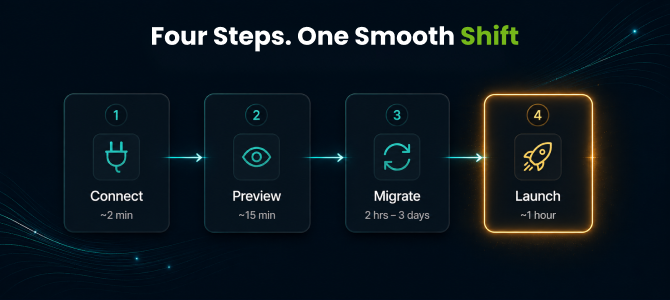
The cleanest migrations follow four stages:
- Connect your Squarespace store through a guided, one-click setup, with no manual CSV wrangling required.
- Preview a demo migration against a slice of your catalog to confirm everything maps correctly before committing.
- Migrate the full store while your Squarespace site keeps taking live orders, typically finishing anywhere from two hours to three days depending on catalog size.
- Launch with a final sync for anything that came in mid-migration, the DNS switch, and ideally a rollback window in case anything needs a second look.
Talk to a migration expert about your catalog size and timeline before scheduling the move.
Tool Gaps
Why Most Migration Tools Fall Short
Here's what catches merchants off guard: a lot of generic migration tools handle basic product listings fine, then quietly leave customers, order history, and content pages behind. That means you're rebuilding half your store manually after the "migration" is supposedly done.
That's the real difference between a tool that migrates products and one that migrates your store. Instead of a bare-bones product import, look for a dedicated Shopify migration app built to move the complete picture: products, customers, orders, blog content, and pages, in one pass, with auto-generated 301 redirects so your SEO doesn't reset to zero when you launch.
See exactly what migrates before you commit to a plan.
SEO Protection
Protecting Your SEO During the Move
SEO is the top worry in almost every platform migration conversation, and for good reason. A move that skips redirect handling can cost months of ranking recovery.
Look for these essentials:
- Automatic 301 redirects on every URL
- Migrated meta titles and descriptions
- Preserved image alt text
That combination is what keeps your existing search visibility intact instead of starting over on Shopify.

Pricing
How Much Does a Squarespace to Shopify Migration Cost?
Pricing scales with catalog size rather than a flat agency fee. Smaller stores, up to about 30 products, 30 orders, and 30 customers, plus 2 pages and 2 posts, can migrate on a free plan. Growing catalogs up to 1,000 products, 500 orders, 500 customers, 10 pages, and 10 posts land around $49 as a one-time charge, and larger catalogs up to 5,000 products, 1,000 orders, 1,000 customers, 50 pages, and 50 posts run around $99 one-time.
If your catalog is bigger than that, it's worth reaching out directly for a custom quote rather than assuming a flat number.
Get an instant price estimate based on your catalog size.
Frequently Asked Questions (FAQs)
1. How long does a Squarespace to Shopify migration take?
Most stores complete the full migration in two hours to three days, depending on catalog size and how much content needs to move alongside products.
2. Will I lose my SEO rankings when I migrate Squarespace to Shopify?
Not if the migration handles it properly. Automatic 301 redirects, migrated meta titles and descriptions, and preserved alt text are what keep your existing rankings intact after the switch.
3. Can I migrate customers and order history, or just my products?
This is exactly where a lot of migration tools fall short. Many only move product listings and leave customer accounts and order history for you to rebuild manually. A complete migration should carry across customers, orders, blog content, and pages alongside your product catalog.
4. Do I need a developer to migrate Squarespace to Shopify?
Not for a standard migration. A guided, one-click connection means you authorize access rather than exporting and reformatting CSV files by hand. Developer help really only becomes necessary for heavily customized storefronts or unusual integrations.
5. What's the difference between a generic migration tool and a full-service one like Shift It Now?
Generic tools typically move only products, leaving customers, orders, and SEO redirects for you to rebuild by hand. A full-service tool migrates the complete store: products, customers, orders, blog content, and pages, in one pass, with a safety net if something looks off after launch.
6. What doesn't migrate from Squarespace to Shopify?
Standard store data, including products, customers, orders, blog posts, and pages, all migrate. Anything tied to a heavily customized Squarespace layout or a niche third-party extension with no direct Shopify equivalent may need manual review, which is exactly what the preview step is designed to catch before you commit.
Final Thoughts
Final Thoughts
Switching platforms doesn't have to mean a rebuilt-from-scratch store or weeks spent manually re-entering customers and orders. With the right approach, a Squarespace migration to Shopify moves your full catalog, customer base, and SEO equity across in days, not months.
Ready to Migrate Your Squarespace Store?
Install Shift It Now from the Shopify App Store and run a free demo migration on your real Squarespace catalog. No card required.
Why Choose Shift It Now?
- ✔ Automated Squarespace to Shopify migration
- ✔ Products, customers, orders, pages, and blog content transferred
- ✔ SEO-friendly migration with 301 redirects
- ✔ No CSV exports or manual scripts required
- ✔ Minimal downtime during launch