How to Switch Ecommerce Platforms Without Your Customers Ever Noticing
Want to switch ecommerce platforms without losing customers or sales? Learn how to keep your store live, protect links and orders, and launch smoothly.
Short answer: you can make the switch invisible where it matters most, and honest about the rest. A well-run move means no downtime, no broken links, no missing orders, and no lost accounts. A few things, like a new look or a different sign-in screen, will be visible, so the goal is to make those feel planned rather than accidental. If you want to switch ecommerce platforms without a flood of confused emails, here is what to protect, what to announce, and how to launch without a hiccup.
What Customers Actually Notice (and What They Don't)
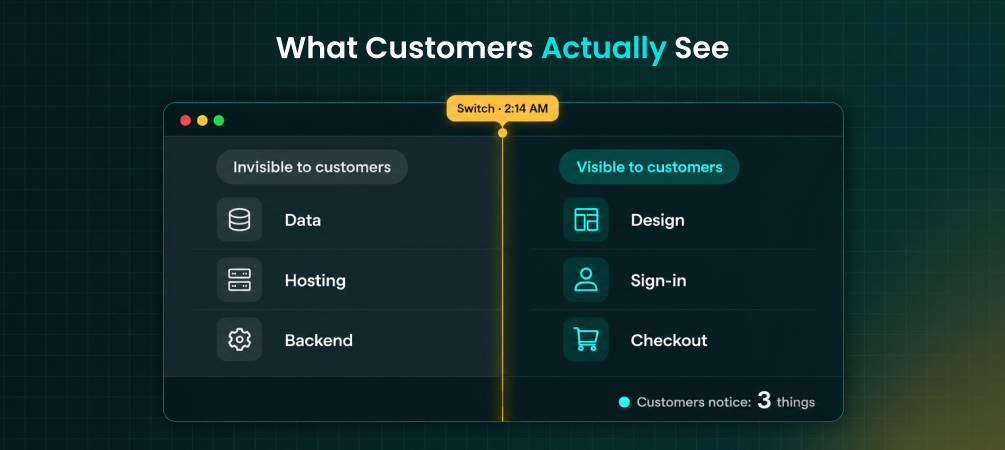
When you switch ecommerce platforms, customers rarely care which platform runs your store. They care about whether the site loads, whether their old links work, whether their order history is still there, and whether checkout feels familiar. Those are the things that make a switch noticeable in the wrong way. Behind the scenes, nobody sees your database moving. The real work of an ecommerce platform migration is keeping those four promises intact while everything underneath changes.
👉 See what ShiftItNow migrates in a single pass so nothing customers rely on gets left behind.
Keep Your Old Store Live Until the Very Last Step
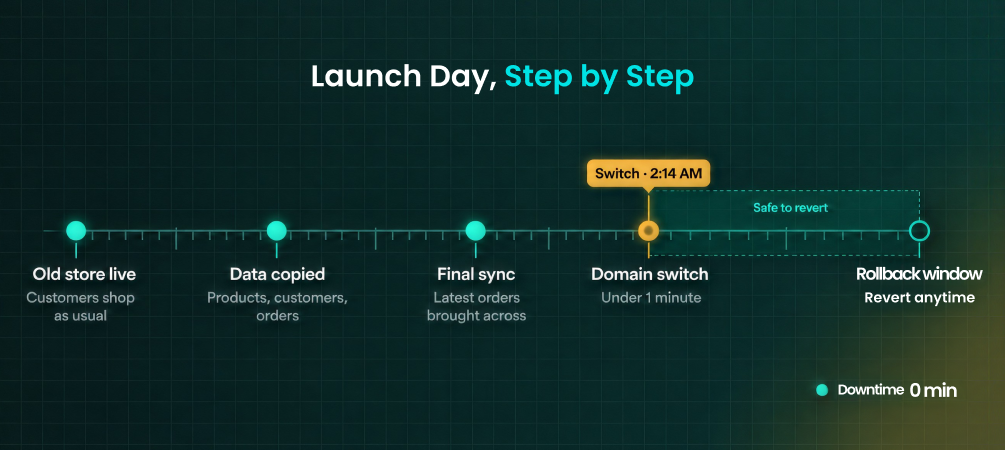
The single biggest reason customers notice when you switch ecommerce platforms is downtime. The fix is a zero downtime migration: your original store keeps taking orders while your data copies across to Shopify in the background. Nothing changes for shoppers until launch day, when a final sync picks up any orders or customers that arrived mid-migration and you point your domain at the new store. If you copy your data first and test it thoroughly, the switch itself takes about an hour instead of a weekend of "we'll be back soon" banners.
Protect the Links Customers Already Have
Shoppers return to your store through bookmarks, old emails, social posts, and Google results. If those links break, customers notice immediately, and so does your search ranking. Every old URL needs a 301 redirect to its new Shopify address. One honest note: Shopify adds fixed prefixes like /products/ to your URLs, so they won't look identical, but a proper redirect sends people to the right page without them ever seeing an error. We cover that in more detail in our guide to preserving your URL structure when moving to Shopify.
👉 Run a demo migration with ShiftItNow and see your redirect plan before anything goes live.
Carry Over Accounts and Order History
Nothing makes a customer feel a switch like logging in and finding their past orders gone. A complete migration brings over customer accounts, addresses, and order history together with your products, so returning shoppers see what they expect. Passwords are the one thing that cannot move between platforms, but Shopify's current accounts use an email code to sign in instead of a password, which makes the handoff simpler than it used to be. Our guide on migrating customer accounts to Shopify walks through exactly what to expect.
Tell Customers About the Few Things They Will See
Being upfront beats hoping nobody notices. Three changes tend to be visible. First, your design: layouts don't transfer between platforms, so your new theme will look different, and it helps to keep your logo, colors, and fonts consistent. Second, sign-in: customers will enter an emailed code instead of a password. Third, saved payment methods: stored cards live with your payment processor, not your store platform, so they usually only carry over through a direct processor-to-processor transfer, and otherwise customers re-enter them once. A short announcement email a few days before launch turns these from surprises into non-events.
👉 Talk to a migration expert about planning your launch day and customer announcement.
Why Most Migration Tools Make the Switch Visible
Most migration tools move product listings and stop there. That leaves customer accounts, order history, and redirects as manual cleanup, which is exactly how stores end up with shoppers who can't find their orders and links that lead nowhere. Most tools also give you no preview and no way back if something looks wrong after launch, which makes it risky to switch ecommerce platforms on a live store. Instead, use a complete migration tool like ShiftItNow: it runs a preview migration first, moves products, customers, orders, blog content, and pages together, and gives you a 7-day rollback window after launch, so a problem becomes a quick fix instead of a public mistake.
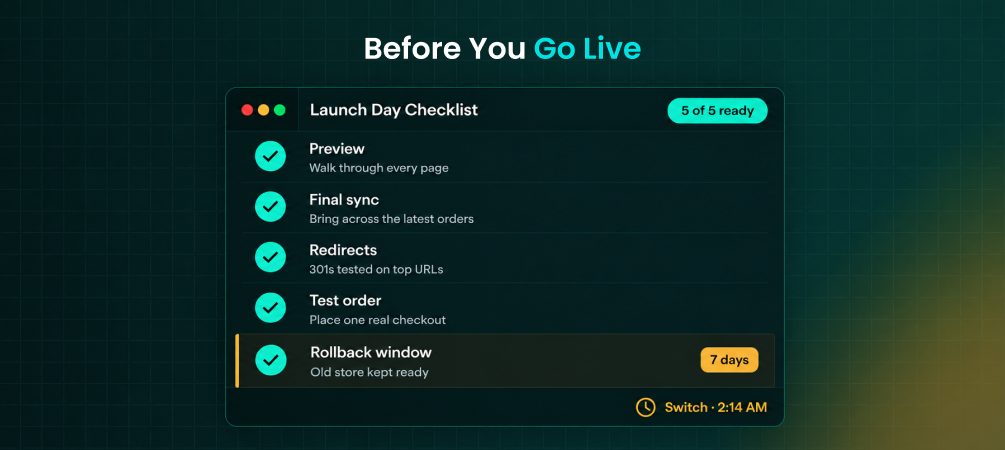
Switch Day Checklist
- Run a preview migration and review it before committing
- Keep your old store live and taking orders until the final sync
- Confirm every old URL redirects to its new Shopify page
- Place a test order and check confirmation and shipping emails
- Announce the new sign-in and design a few days ahead
- Choose a quieter traffic period, not a sale week
- Keep your rollback window in mind for the first week
👉 Migrate your full store with ShiftItNow and launch with a rollback safety net in place.
For more on timing and risks, see how long a Shopify migration really takes and the most common Shopify migration mistakes.
FAQ: Switching Ecommerce Platforms Without Disruption
Will my store go offline when I switch ecommerce platforms?
Not with a properly run migration. Your original store keeps taking orders while data copies in the background, and the only brief change is the domain switch at launch.
Will my customers be able to log in with their old passwords?
No. Passwords can't transfer between any two platforms. On Shopify, customers sign in with an emailed code instead, so there is no password to reset.
Will customers see their past orders on the new store?
Yes, if order history is migrated alongside customer accounts. Many migration tools skip this, so confirm it before you commit.
Do saved credit cards carry over?
Usually not through a store migration. Saved cards are held by your payment processor, so they transfer only through a processor-level move. Otherwise customers re-enter them once.
What happens if something goes wrong after launch?
With a rollback window, you can revert quickly while you fix the issue. ShiftItNow includes a 7-day rollback safety net after launch.
Will my old links and Google rankings still work?
Yes, as long as every old URL has its own 301 redirect to the new page. This is one of the main reasons to use a migration tool that builds your redirects automatically.
The best way to switch ecommerce platforms is the one customers barely register: the site stays up, their links work, their orders are still there, and the few visible changes were announced ahead of time.
👉 Install ShiftItNow from the Shopify App Store and run a demo migration on your real catalog before you commit.