How Long Does a Shopify Migration Take?
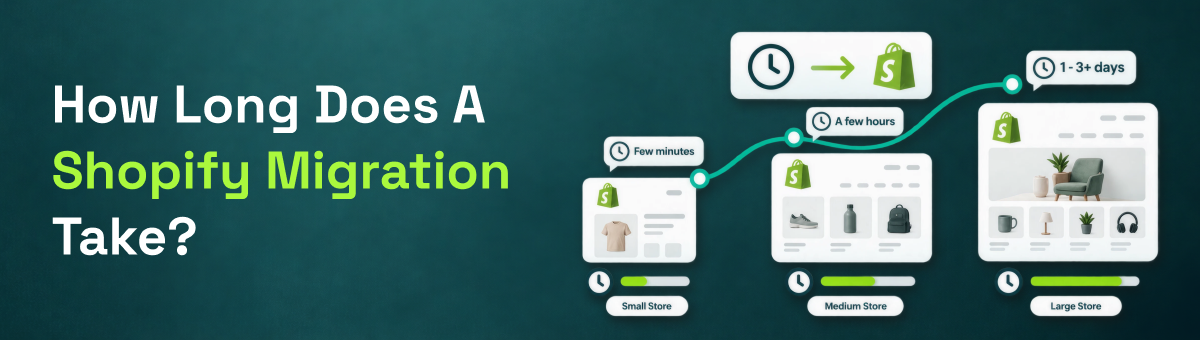
Short answer: most Shopify migrations move the actual data — products, customers, orders — in anywhere from a couple of hours to three days, depending on catalog size. The full project, including planning, a preview run, and testing before launch, typically spans one to three weeks. The number one thing that determines where you land in that range isn't the platform you're coming from — it's how much data you're moving and whether you're using an automated Shopify migration tool or rebuilding by hand.
Typical Shopify Migration Timelines at a Glance
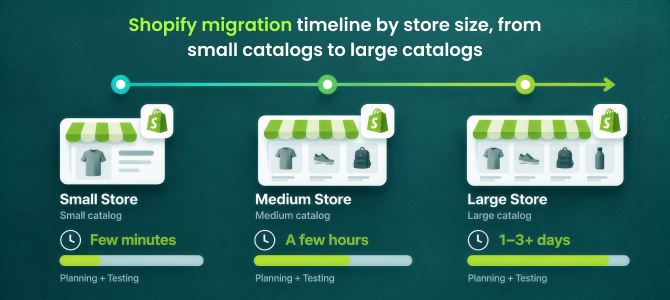
For a small catalog under 500 products with modest customer and order history, the data transfer itself often finishes same-day — sometimes in a couple of hours. A mid-size catalog in the 500 to 5,000 product range typically takes one to three days to fully migrate. Larger or more complex catalogs — 5,000+ products, heavy variant counts, years of order history — can run three to seven days for the data transfer alone. In every case, add planning and testing time on top: even a fast technical migration benefits from a few days of QA before you point your domain at the new store.
Get a time estimate for your specific catalog before you commit to a migration date.
What Actually Determines Your Shopify Migration Timeline
Catalog size and variant count are the biggest factors — a product with ten variants takes longer to map correctly than a simple single-SKU item. Customer and order history volume matters too, especially years of historical orders. Content volume — blog posts, static pages, help center articles — adds time if it needs individual redirect mapping. The platform you're migrating from plays a smaller role than people expect: platforms with clean, well-documented APIs generally connect and sync faster than those requiring manual CSV exports, though the difference is usually measured in minutes at the connection stage, not days overall. And by far the biggest swing factor is whether you're using a dedicated migration app or attempting a manual, spreadsheet-based rebuild.
The 4-Stage Migration Process, and How Long Each Stage Takes
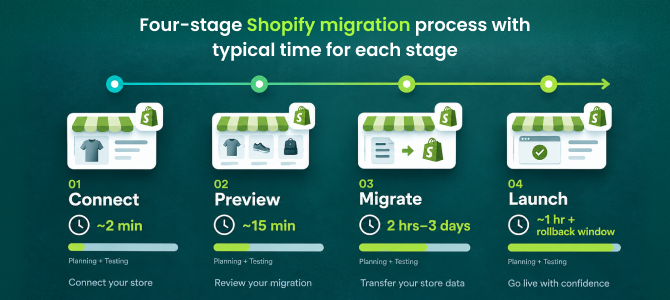
A well-structured Shopify migration breaks into four stages, each with its own rough timeframe. Connect — authorizing access to your current store — usually takes about two minutes. Preview — running a demo migration on a slice of your catalog to confirm everything maps correctly — takes roughly fifteen minutes and is worth every one of them, since it catches mapping issues before they touch your full catalog. Migrate — the full data transfer — is where most of the time budget goes, running anywhere from two hours to three days depending on catalog size, while your original store keeps taking live orders in the background. Launch — the final sync, DNS switch, and going live — typically takes about an hour, ideally with a rollback window afterward in case anything needs a second look.
Run a free demo migration with ShiftItNow to see your actual Preview-stage timing before scheduling launch.
Automated Tools vs. Manual Rebuilds: The Real Timeline Gap
This is where migration timelines diverge the most. A manual migration — exporting CSVs, reformatting them, re-uploading products, then separately re-entering customers and rebuilding order history — commonly stretches into weeks, especially once you factor in fixing formatting errors along the way. A hired agency rebuild often runs similarly long once discovery calls and revisions are factored in. An automated Shopify migration tool compresses that same work into hours or days instead, because products, customers, orders, and content move together rather than as separate manual projects.
Here's the catch worth knowing: most migration tools only automate the products portion and still leave customers, order history, and content migration as a manual step afterward — which quietly adds days back onto a timeline that looked fast on paper. A complete migration tool should move products, customers, orders, blog content, and pages together in the same pass, which is what actually keeps the full timeline short rather than just the product-import portion of it.
See what migrates in one pass instead of piecing together multiple tools and manual imports.
How to Avoid Migration Timeline Delays
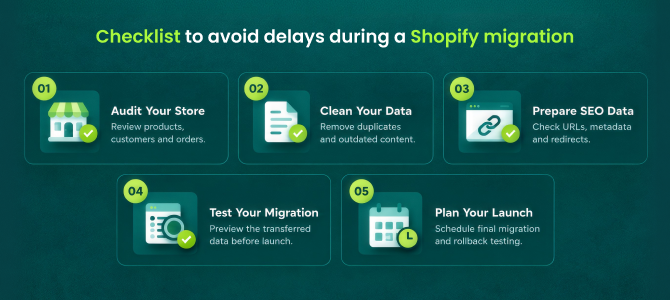
- Audit your current store's content and app stack before migration day, not during it
- Run a preview/demo migration early enough to fix mapping issues without pressure
- Schedule the migration for a lower-traffic week, not your busiest sales period
- Have DNS and domain access ready in advance so the launch step isn't held up waiting on credentials
- Budget real testing time — checkout, shipping, tax, discount codes — before going fully live
- Decide who owns go/no-go on launch day ahead of time, so a minor issue doesn't stall the whole timeline while people figure out who makes the call
Talk to a migration expert about the fastest realistic timeline for your store.
For a broader look at what can go wrong along the way, see our guide on common Shopify migration mistakes, and if rankings are part of your timeline concern, here's what actually affects your SEO during a Shopify migration.
FAQ: Shopify Migration Timelines
How long does a small Shopify migration take?
For catalogs under 500 products, the data transfer itself often finishes in a few hours to a day. Add a few days for testing before you fully launch.
How long does migrating a large catalog take?
Catalogs with 5,000+ products, heavy variant counts, or years of order history typically take three to seven days for the data transfer, plus additional testing time before launch.
Will my store be down during migration?
No, not with a properly run migration. Your original store keeps taking orders while data transfers in the background, and downtime is limited to a short window during the final DNS switch at launch.
How much testing time should I budget before fully launching?
At minimum, a few days to test checkout, shipping rates, tax settings, and discount codes on the new store before pointing your domain at it permanently.
Can I speed up a Shopify migration?
Yes — using a dedicated migration tool that moves products, customers, orders, and content together (rather than as separate manual steps) is the single biggest way to shorten the overall timeline.
Does a longer migration mean a safer one?
Not necessarily. Migration length is mostly a function of catalog size and data volume, not thoroughness. A well-built automated migration can be both fast and complete.
The honest answer to "how long does a Shopify migration take" is: shorter than most merchants expect, as long as you're using a tool that moves your whole store — not just products — in one coordinated pass instead of several manual ones.
Install ShiftItNow from the Shopify App Store and run a free demo migration to see your real timeline. No card required.