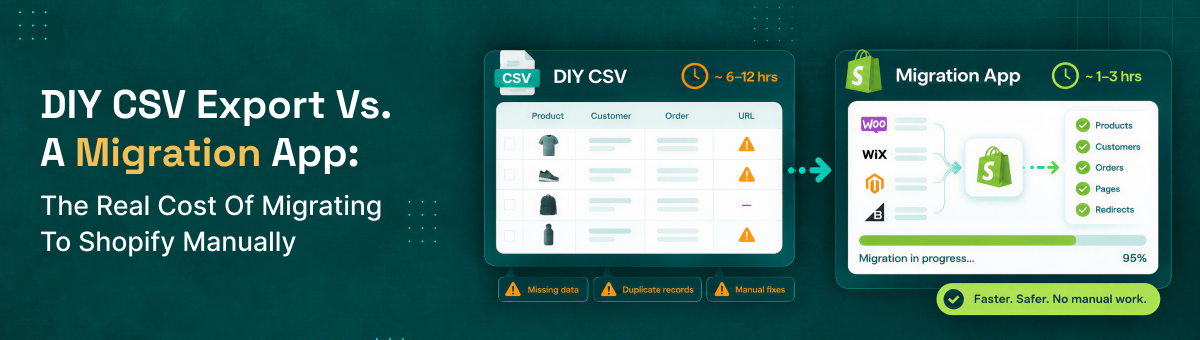
DIY CSV Export vs. a Migration App: The Real Cost of Migrating to Shopify Manually
"Just export a CSV" sounds simple enough that plenty of merchants start a Shopify migration convinced it's a free weekend project. In practice, a manual CSV migration usually costs more than it looks like on paper — just not in a line item you see up front. It shows up as staff hours, re-work, and gaps in your data that only surface after launch. Here's an honest breakdown of what a DIY Shopify migration actually involves, what it typically costs once you count the hidden parts, and where it stacks up against using a dedicated migration app.
What a DIY CSV Migration Actually Involves
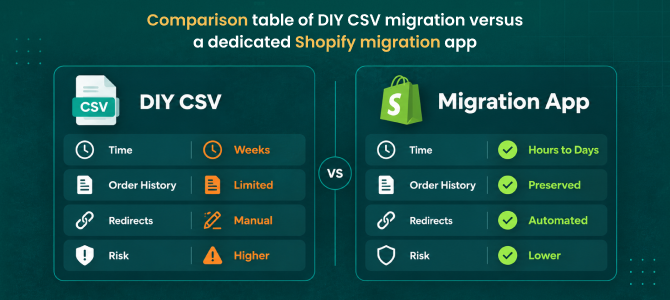
On the surface, it's an export and an import. In reality, it's exporting your products, manually reformatting every column to match Shopify's specific CSV structure, re-uploading images separately since most source platforms don't export image files in a Shopify-ready format, and repeating a similar process for customers. Here's the part that catches almost everyone off guard: Shopify's native CSV import only supports products and customers — there's no built-in way to bulk-import historical orders through the standard admin. If you want your order history on Shopify, a plain CSV export won't get you there on its own.
See what actually migrates with ShiftItNow — including order history, not just products.
The Hidden Time Cost Nobody Budgets For
Reformatting a product CSV correctly — matching variant and option columns, fixing category mismatches, cleaning up encoding errors — routinely eats far more time than the export itself. Then there's SEO: Shopify does let you bulk-upload URL redirects via CSV, but someone has to actually build that mapping, old URL to new URL, one row at a time, across every product, collection, and blog post. That's not a technical blocker, it's a labor cost — and it's the exact step most manual migrations skip because it's tedious, which is precisely why so many stores lose rankings after a "successful" migration.
Run a free demo migration with ShiftItNow instead of building redirect maps by hand.
The Real Dollar Cost: Time Isn't Free
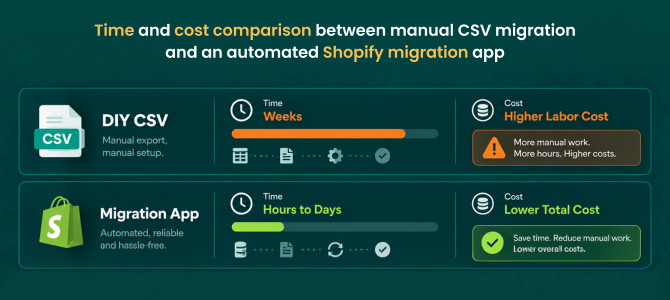
Say a manual migration takes a marketing coordinator or store owner 40 to 60 hours spread across a couple of weeks — reformatting files, re-uploading images, manually re-entering orders one by one, chasing down formatting errors. At a modest $25–$40/hour opportunity cost, that's $1,000–$2,400 in staff time alone, before counting the cost of any mistakes that need redoing. Compare that to a migration tool with a one-time charge that finishes the same data transfer in hours, and "free" DIY migration often ends up being the more expensive option once you count what it actually takes.
What Manual Migration Typically Leaves Behind
- Order history — not natively importable via Shopify's standard CSV tools
- Customer passwords — never transfer with any method, DIY or otherwise, since they're encrypted
- SEO redirects — technically possible via CSV upload, but the mapping has to be built manually, URL by URL
- A rollback option — if something breaks after cutover, there's no built-in way to safely revert
- Blog content and pages — usually require a separate, manual copy-paste process entirely outside the CSV workflow
Where DIY CSV Migration Actually Makes Sense
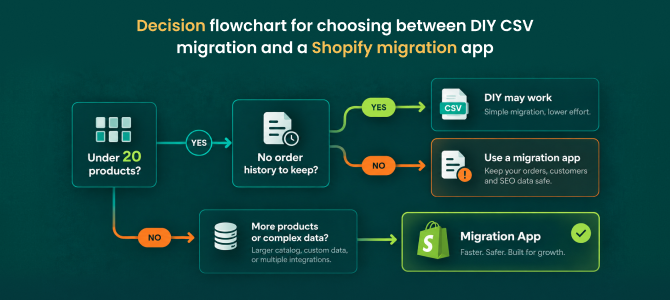
To be fair, manual migration isn't always the wrong call. If you're running a very small catalog — under 20 or so products, no customer accounts worth preserving, comfortable working in spreadsheets, and starting fresh on SEO anyway — a manual export can genuinely be the simplest path. The math changes once customer accounts, order history, or existing search rankings are worth protecting.
Talk to a migration expert about whether DIY or an automated migration makes sense for your store size.
What a Dedicated Migration App Does Differently
Here's the catch worth knowing before you assume "using an app" automatically solves everything: most migration tools are really just a nicer interface wrapped around the same product-only CSV limitation, and still leave order history and redirects as a manual afterthought. A complete migration tool should close those exact gaps — moving products, customers, full order history, blog content, and pages together in one pass, while generating your 301 redirect map automatically instead of leaving you to build it by hand.
Migrate your full store — not just products — in one pass with ShiftItNow.
The Bottom Line
DIY CSV migration isn't free — it's prepaid in staff hours, and it typically leaves order history, redirects, and rollback protection as problems for later. A dedicated migration tool trades a modest upfront cost for a fraction of the time and a much lower chance of discovering a data gap after you've already launched.
For more on what a properly structured migration looks like, see our guides on common Shopify migration mistakes and how long a Shopify migration actually takes.
FAQ: Manual Migration vs. Migration Apps
Can I import my order history into Shopify using a CSV?
Not through Shopify's standard admin — native CSV import covers products and customers only. Bringing over historical orders requires a dedicated migration app or custom API work.
Is a DIY CSV migration actually free?
Not in practice. There's no software cost, but the staff time spent reformatting files, re-uploading images, and manually building redirects usually adds up to more than the price of a migration tool.
How much time does a manual Shopify migration typically take?
Commonly 40–60+ hours spread across one to three weeks for a mid-size catalog, versus hours to a few days with an automated migration tool.
Will a CSV migration preserve my SEO rankings?
Only if you separately build a complete 301 redirect map yourself — Shopify supports bulk redirect uploads, but nothing generates that mapping automatically for you in a plain CSV migration.
What's the biggest risk of migrating manually?
Discovering a gap — missing orders, broken redirects, lost customer data — after you've already launched and turned off your old store, with no rollback option to fall back on.
Is a migration app worth it for a small store?
For very small catalogs with no order history to preserve, DIY can be reasonable. Once customer accounts, order history, or existing rankings matter, the time saved by a migration app usually outweighs its cost.
The real cost of a manual migration was never the CSV export itself — it's everything Shopify's native tools don't cover that you end up rebuilding by hand. A complete migration tool exists specifically to close that gap.
Install ShiftItNow from the Shopify App Store and see the real cost difference for your own catalog. No card required.