Will I Lose My Google Rankings If I Move to Shopify?
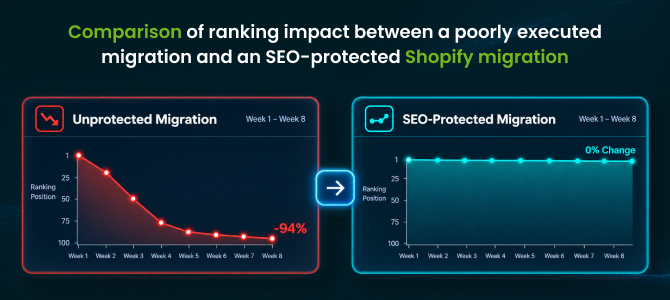
Short answer: not if the migration is done correctly. Ranking drops during a platform switch aren't caused by Shopify itself — they're caused by broken URLs, missing redirects, and lost metadata during the move. Google doesn't penalize stores for changing platforms; it penalizes anything that makes previously-ranked pages disappear or become unreachable. If you understand what actually causes SEO damage during a Shopify migration, you can prevent nearly all of it.
Why Rankings Actually Drop During a Migration
Every time you migrate, your URLs almost always change structure, even if only slightly. If those old URLs aren't mapped to their new equivalents, Google's crawler hits a dead end, the page drops out of the index, and the ranking — along with any backlinks pointing to it — goes with it. The other common causes: meta titles and descriptions that don't carry over, image alt text that gets stripped during the move, and structured data (schema) that isn't rebuilt on the new platform. None of these are Shopify's fault — they're migration execution problems.
See how ShiftItNow handles SEO-safe migrations with redirects and metadata built in.
The #1 Factor: 301 Redirects Done Right
If there's one thing that determines whether you keep your rankings, it's this: every old URL needs an individual 301 redirect to its specific new Shopify equivalent — not a blanket redirect dumping every old page onto your new homepage. A blanket redirect tells Google "this specific page no longer exists," which is almost as damaging as no redirect at all. A proper one-to-one redirect map tells Google exactly where each page moved, which passes along the ranking signal instead of resetting it.
Run a free demo migration with ShiftItNow to see your redirect map before anything goes live.
What Else Affects Your SEO During the Move
Beyond redirects, a few other things quietly influence how well your rankings hold up: whether your meta titles and descriptions migrate along with the content (not just the products), whether image alt text survives the move, whether your site speed on Shopify matches or beats your old platform, and whether your XML sitemap gets resubmitted to Google Search Console after launch so Google knows to recrawl the new structure quickly.
Backlinks are worth calling out separately, since they're easy to overlook. Every external site linking to one of your old product or blog URLs is passing along authority to that specific page. If the URL disappears without a redirect, that backlink now points to a dead page instead of your content — you don't just lose the ranking, you lose the value of every link pointing at it too. This is one of the clearest reasons a one-to-one redirect map matters more than people expect going into a migration.
How Long Does It Take for Rankings to Recover?
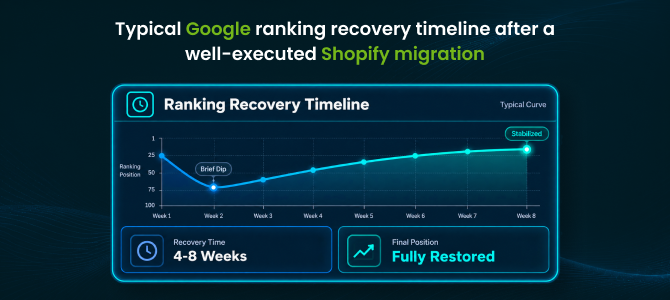
Even a well-executed migration usually causes some short-term fluctuation — that's Google recrawling and re-indexing your new URLs, not a sign something went wrong. Industry benchmarks generally put full stabilization at around four to eight weeks for a properly redirected migration. What you're watching for during that window is different: temporary fluctuation is normal, but a sustained drop with no recovery signal usually means a redirect or indexing issue that needs fixing, not something to wait out.
Two things speed up that recovery window: submitting your updated sitemap the same day you launch, rather than days later, and manually requesting indexing on your highest-traffic pages through Search Console instead of waiting for Google to discover them on its own schedule.
Talk to a migration expert about protecting your specific rankings before you move.
Why Most Migration Tools Put Your Rankings at Risk
Here's the part that catches merchants off guard: most migration tools only move product data and don't touch redirects, meta tags, or alt text at all — meaning the SEO work is left entirely up to you, after the fact, once rankings have already started slipping. A dedicated Shopify migration app should generate 301 redirects automatically as part of the migration itself, along with migrating your existing meta titles, descriptions, and alt text — not leave SEO as a manual cleanup project you discover you need three weeks after launch.
A Quick SEO Migration Checklist
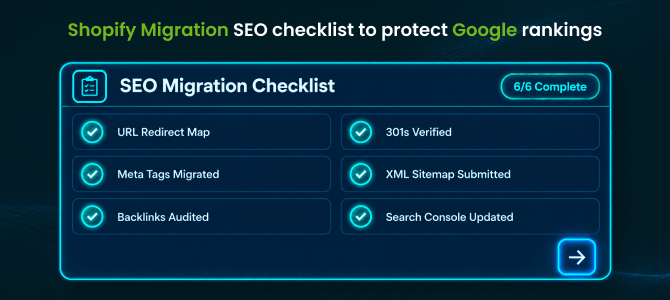
- Export a full list of your current URLs before migrating anything
- Map every old URL to its new Shopify equivalent with a 301 redirect
- Confirm meta titles, descriptions, and alt text migrated along with content
- Resubmit your updated XML sitemap in Google Search Console after launch
- Monitor Search Console for crawl errors and 404s during the first 30 days
- Keep your old domain/DNS active during the transition rather than shutting it off immediately
Migrate with automatic redirects and metadata preservation instead of rebuilding your SEO from scratch.
If you're weighing this alongside other migration risks, our guide on common Shopify migration mistakes covers the broader list beyond SEO, and our platform guides for Wix, BigCommerce, and Squarespace go deeper on what to expect from your specific platform.
FAQ: SEO and Shopify Migration
Will I definitely lose rankings when I migrate to Shopify?
Not necessarily. Ranking drops come from execution mistakes — missing redirects, lost metadata — not from switching platforms itself. A properly redirected migration typically preserves the large majority of existing rankings.
How long does it take for rankings to stabilize after migration?
Most well-executed migrations stabilize within four to eight weeks as Google recrawls and re-indexes the new URL structure. Some short-term fluctuation during that window is normal.
Do I really need to redirect every single URL, even old blog posts?
Yes. Any indexed page — including old blog posts — can be driving rankings and referral traffic. Skipping redirects on "minor" pages is one of the more common ways migrations lose more SEO value than necessary.
Will moving to Shopify affect my domain authority?
Not directly, as long as you keep your domain and don't introduce a new one. Domain authority is tied to your domain and backlink profile, not your ecommerce platform — the risk comes from broken pages losing the backlinks pointing to them, not the platform switch itself.
Can I keep my blog content and its existing rankings when I migrate?
Yes, if your blog posts are migrated along with your product catalog and each post gets its own 301 redirect. Migration tools that only move products and skip blog content put that traffic at unnecessary risk.
What's the fastest way to check if a migration hurt my SEO?
Check Google Search Console's Coverage and Performance reports in the first two weeks after launch. A spike in 404 errors or a sudden drop in impressions for previously-ranking pages is the earliest signal something needs fixing.
Losing rankings isn't an inevitable cost of moving to Shopify — it's what happens when redirects and metadata get treated as an afterthought instead of part of the migration itself. Handle that properly, and Shopify's own SEO tooling can put you in a stronger position than where you started.
Install ShiftItNow from the Shopify App Store and migrate with SEO protection built in from the start. No card required.