
 Install on Shopify
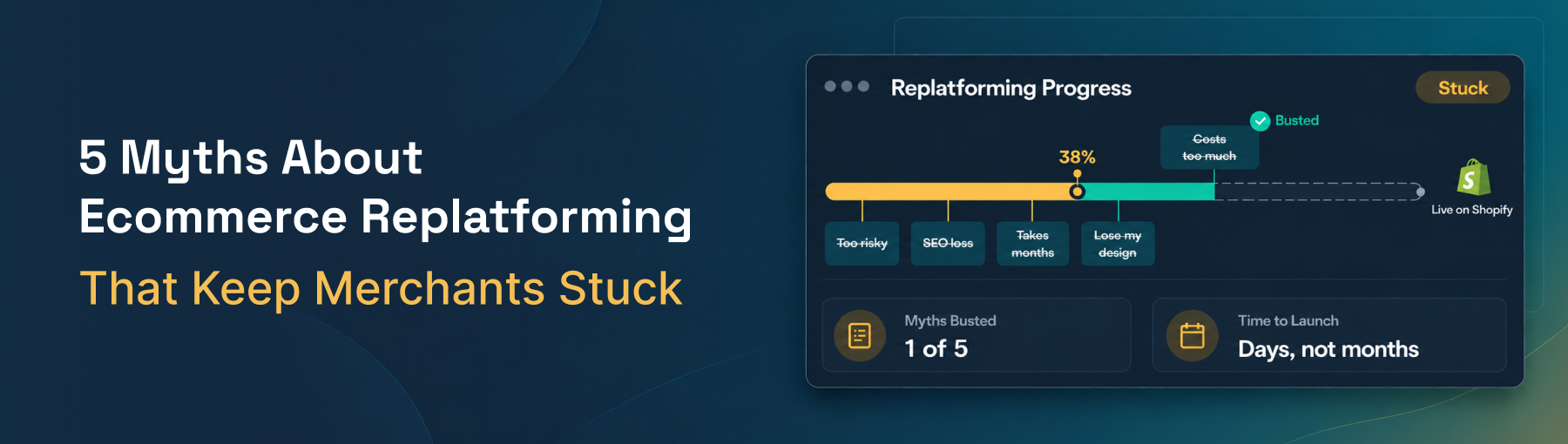
5 Myths About Ecommerce Replatforming That Keep Merchants Stuck
Afraid of ecommerce replatforming? Here are five common myths about downtime, SEO, customer data, and cost, and what is actually true when you move to Shopify.
Short answer: most of what keeps merchants stuck on a platform they've outgrown is a myth, or a half-truth left over from how migrations used to go. Ecommerce replatforming has a reputation for broken sites, lost rankings, and months of cleanup. Some of that reputation is earned, but mostly by manual projects and weak tools, not by the move itself. Here are five common myths, what's actually true, and where a myth holds a grain of truth worth planning for.
Myth #1: "You'll Lose Your Google Rankings"
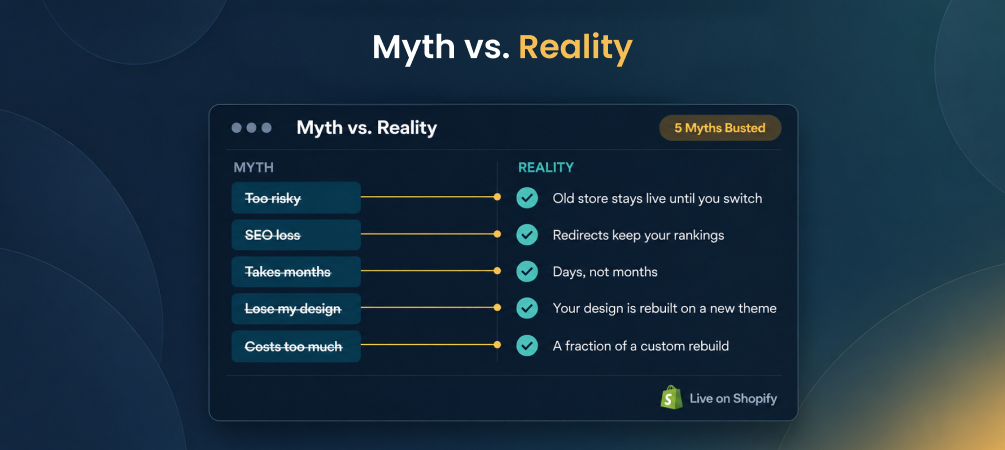
This is the biggest fear, and it's only partly a myth. Rankings do drop when old URLs have no redirects and when meta titles and image alt text get left behind. They don't drop simply because you changed platforms. When every old URL gets its own 301 redirect and your SEO data comes along, rankings usually stabilize within a few weeks of launch, and some short-term fluctuation is normal while Google recrawls. Our guide on what actually affects your Google rankings during a Shopify migration breaks this down step by step.
👉 See how ShiftItNow protects your SEO with automatic redirects built into the migration.
Myth #2: "Your Store Will Be Down for Days"
Manual migrations used to mean a maintenance page and crossed fingers. A zero downtime migration works differently: your original store stays live and keeps taking orders while your data copies to Shopify in the background. At launch, a final sync picks up anything that arrived mid-migration, and then you point your domain at the new store. The part customers could notice is measured in minutes to about an hour, not days. The grain of truth: it's still smart to launch during a quieter week rather than in the middle of a big sale.
Myth #3: "Your Customers Will Have to Start Over"
The honest version is that customers will notice a couple of things. Passwords can't transfer between any two platforms, and Shopify's current customer accounts sign in with an emailed code instead of a password. Saved credit cards live with your payment processor, so they usually only carry over through a processor-level transfer. But accounts, addresses, and order history can all move across, which means no one logs in to an empty account. We cover the details in our guide to migrating customer accounts to Shopify.
👉 Run a demo migration with ShiftItNow and check your customer and order data before anything goes live.
Myth #4: "Replatforming Means Rebuilding Everything, and It Takes Months"
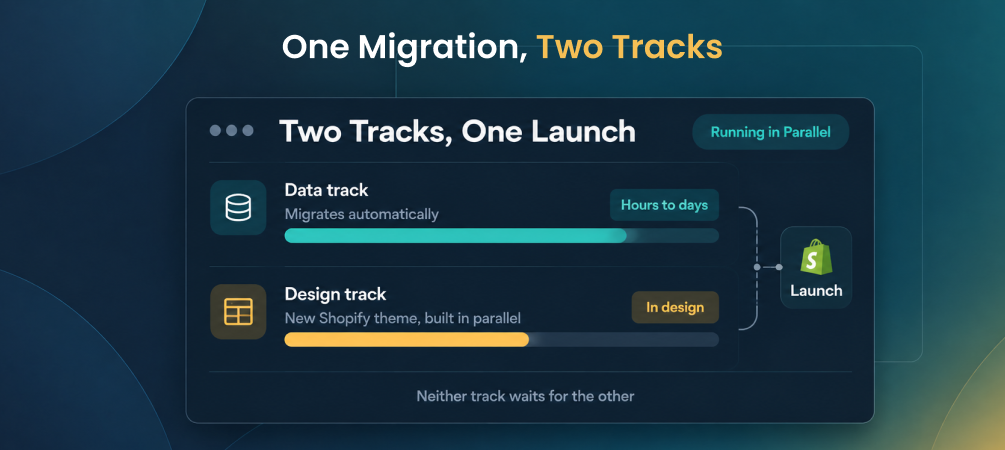
This one is half true. Your visual design does not migrate, because Shopify runs on its own theme system, so your new storefront is a separate build. That's also a chance to modernize a layout you've outgrown. But your data does not need rebuilding. Products, customers, orders, blog posts, and pages can all move across, and the transfer itself typically takes anywhere from a couple of hours to three days depending on catalog size. The full project, including planning and testing, usually runs one to three weeks, and a standard migration doesn't require a developer. For more detail, see what happens to your store design during a migration and how long a Shopify migration really takes.
Myth #5: "Any Migration Tool or CSV Export Will Do the Same Job"
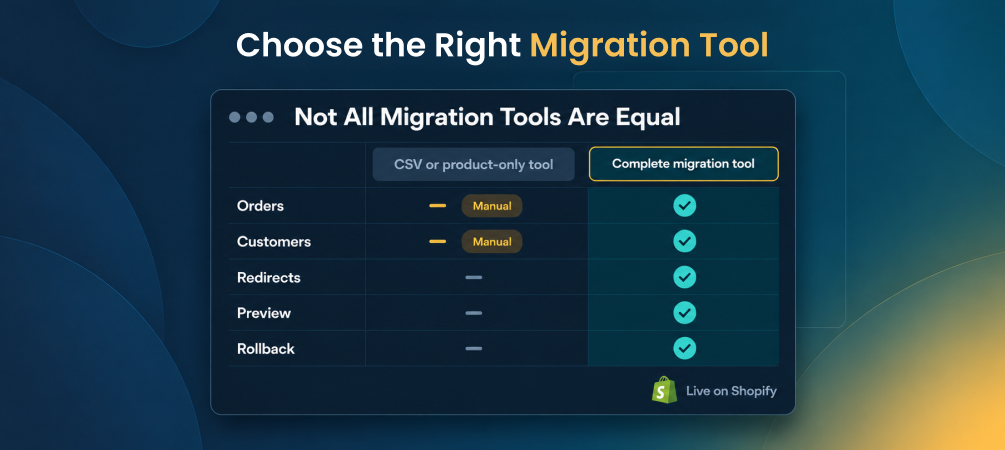
This is the myth that does the most damage. Shopify's built-in CSV import covers products and customers, but it has no way to bring in your historical orders, and building a redirect map by hand is a project of its own. Most migration tools simply wrap that same product-only approach in a nicer interface, leaving order history, customer data, and redirects for you to rebuild afterward. Instead, use a complete migration tool like ShiftItNow, which runs a preview first, moves products, customers, orders, blog content, and pages in one pass, builds your 301 redirects, and gives you a 7-day rollback window after launch. If you're weighing the manual route, here's the real cost of migrating with a CSV export instead of a migration app.
👉 Migrate your full store with ShiftItNow instead of piecing it together after launch.
What's Actually True: A Quick Reality Check
- Rankings are protected by redirects and migrated SEO data, not by staying put
- A properly run migration keeps your old store live until the final switch
- Customer accounts, addresses, and order history can migrate; passwords and saved cards work differently
- Data transfer takes hours to days, while design is a separate parallel build
- A complete migration tool does far more than a basic product import
How to Replatform With Confidence
Start with a preview migration so you can review how your data maps before committing. Choose a lower-traffic week for launch, confirm your redirects, and tell customers about the new look and sign-in ahead of time. For a fuller list of pitfalls, read our guide to common Shopify migration mistakes.
👉 Talk to a migration expert about whether your store is ready to move.
FAQ: Ecommerce Replatforming
Is ecommerce replatforming risky?
It carries risk when it's handled manually or with a product-only tool. With a preview run, automatic redirects, and a rollback window, most of the common risks are covered before they can cause problems.
How long does replatforming to Shopify take?
The data transfer usually takes from a couple of hours to three days, depending on catalog size. Planning, theme setup, and testing typically bring the full project to one to three weeks.
Will I lose sales while I replatform?
Not if your original store stays live until launch day. With a zero downtime migration, you keep taking orders throughout, and only the final domain switch is visible.
Do I need a developer to replatform?
For a standard store migration, no. A guided migration tool handles the data transfer. A developer becomes useful for custom functionality or a fully custom theme.
Do all migration tools move order history?
No. Many tools only move products and leave order history and customer data for you to handle. A complete migration tool like ShiftItNow moves orders and customers in the same pass as your products.
Can I undo a migration if something goes wrong?
With a rollback window, yes. ShiftItNow includes a 7-day rollback safety net after launch, so an issue can be fixed without a crisis.
The myths around ecommerce replatforming usually describe a rushed, manual, product-only move. Plan it properly and use the right tool, and the switch is a lot more routine than the horror stories suggest.
👉 Install ShiftItNow from the Shopify App Store and run a demo migration on your real catalog before you commit.